Creator Pay API (1.0)
The Creator Pay API lets you create creators, collect their payout details, send them payments, and track each payment until the money lands.
Environments
| API host | Where you sign in | |
|---|---|---|
| Sandbox | https://dev.creatorpay.co |
trial.creatorpay.co |
| Production | https://api.creatorpay.co |
app.creatorpay.co |
Build and test against the sandbox. Each environment has its own accounts and API keys, so a sandbox key does not work in production.
What you'll need
- A Creator Pay account with owner or admin privileges, in the environment you are calling.
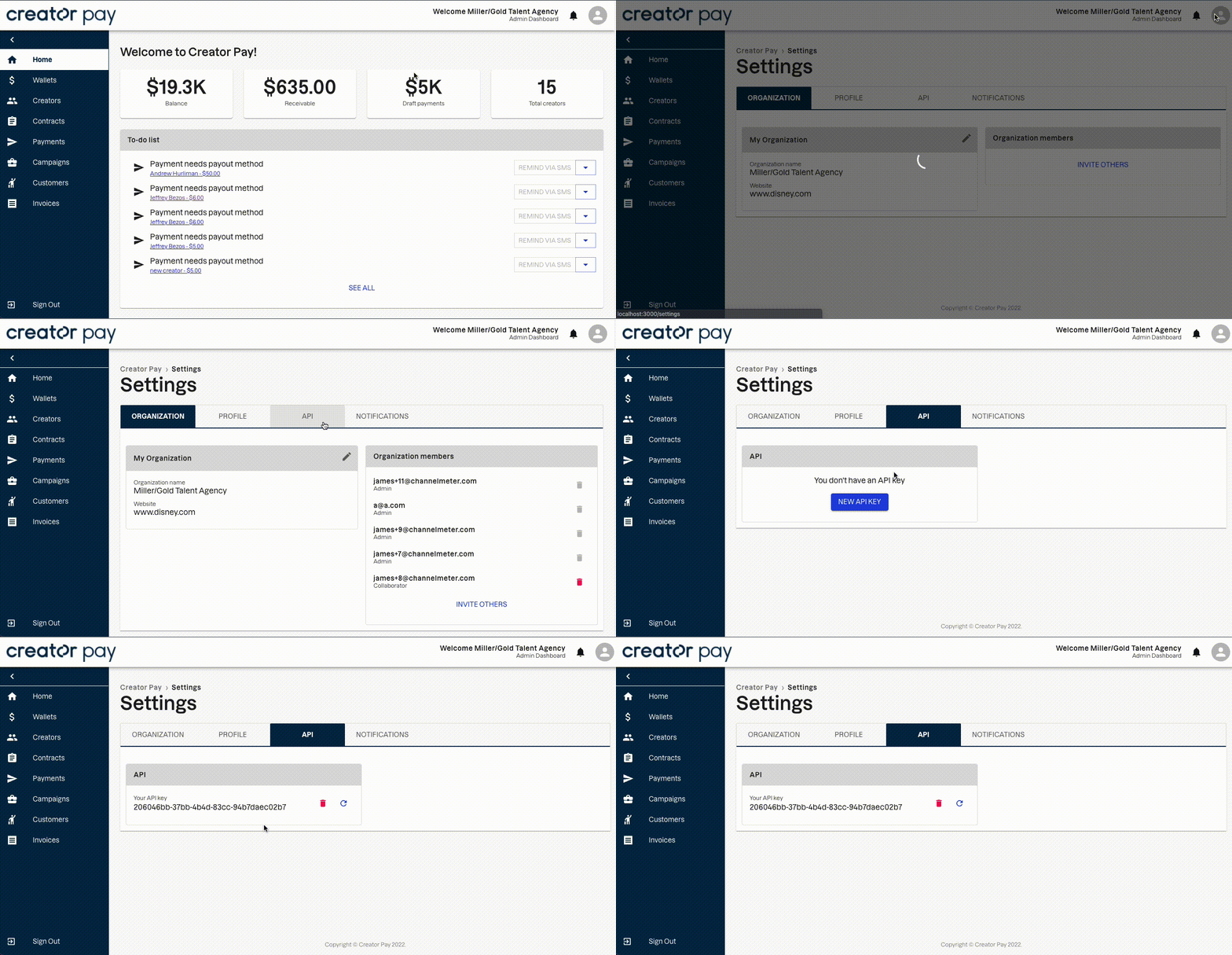
You don't send your API key with each request. You exchange it for a session token, and send that instead.
curl "https://dev.creatorpay.co/v1/org_api_token/session?key=<your_api_key>"
The response body is the token, as a JSON string. A session token is valid for 7 days. Request a new one before it expires.
Send the token in a session-token header. A session token acts as your organization, with admin-level access to every endpoint in this reference.
curl https://dev.creatorpay.co/v1/creators \
  --header 'session-token: <session token>'
This guide walks through paying a creator from start to finish: creating the creator, getting their payout details on file, sending a payment, and knowing when the money has landed.
- A funded account. Payments draw from your Creator Pay balance. Fees are always collected from that balance too, whichever payout method the creator uses. There is no credit line, so fund the account before you send.
- Amounts are in cents, in USD.
27000means $270.00.
- Create the creator with
POST /v1/creators. - Get their payout details on file. Send them yourself, or let Creator Pay collect them from the creator through a hosted form.
- Create payments with
POST /v1/payments. They start as drafts. - Send the payments with
PUT /v1/payments/initiate. - Track each payment with
GET /v1/paymentsuntil it reaches a final status.
Steps 1 and 2 happen once per creator. Steps 3 to 5 repeat for every payout run.
curl -X POST https://dev.creatorpay.co/v1/creators \
  -H "session-token: $SESSION_TOKEN" \
  -H "Content-Type: application/json" \
  -d '[{
    "email": "[email protected]",
    "entity_type": "individual",
    "first_name": "Alex",
    "last_name": "Rivera",
    "phone_number": "+15555550123"
  }]'
The body is an array, so you can create many creators in one call. email and entity_type (individual or business) are required. The response is an array of creators. Store each creator's id. You use it as the payment recipient.
Creating a creator sends them nothing. Creator Pay contacts a creator only when a payment needs details they haven't given yet.
phone_number is optional. If you include it, Creator Pay texts the creator the details form as well as emailing it.
A creator's email address is unique across Creator Pay. If the address already belongs to an account that isn't a creator, such as an organization admin, the request fails. Use a separate address for test creators.
Choose one option per creator.
Option A: you send the details
If you already hold the creator's payout details, send them with PUT /v1/creators/{id}. Always include selected_payment_method. That field tells Creator Pay which details to pay against.
curl -X PUT https://dev.creatorpay.co/v1/creators/$CREATOR_ID \
  -H "session-token: $SESSION_TOKEN" \
  -H "Content-Type: application/json" \
  -d '{
    "selected_payment_method": "paypal",
    "paypal_email": "[email protected]"
  }'
selected_payment_method |
Details to send | Notes |
|---|---|---|
stripe |
account_number, routing_number |
Bank transfer to a US bank account |
paypal |
paypal_email |
Your organization must have PayPal connected |
venmo |
venmo_phone_number |
Sent through PayPal, so it also needs PayPal connected |
Any other value is accepted but never paid. The payment falls back to asking the creator for their details, as in option B.
Option B: Creator Pay collects the details from the creator
Skip the update and go straight to creating the payment. When you send a payment to a creator with no usable details on file, Creator Pay:
- Emails the creator a secure link to a hosted form, and texts it too if a phone number is on file. The form lets them pick a payout method and enter their details. The email's subject line is "You just got paid!", even though no money has moved yet. Tell your creators to expect it.
- Moves the payment to
requires_info.
When the creator submits the form, every payment waiting on them is sent automatically. You don't need to send it again.
The link expires after 14 days. A creator has one live link at a time: a new link replaces the old one.
To send a fresh link, call POST /v1/payments/reminders with the payments that are still in requires_info:
curl -X POST https://dev.creatorpay.co/v1/payments/reminders \
  -H "session-token: $SESSION_TOKEN" \
  -H "Content-Type: application/json" \
  -d '{ "ids": "'"$PAYMENT_ID"'", "reminder_type": "email" }'
ids is one string of comma-separated payment ids. reminder_type is email, sms or all.
Option A also works after the fact. If a payment is waiting in requires_info and you then send the creator's details with PUT /v1/creators/{id}, including selected_payment_method, that payment goes out right away.
curl -X POST https://dev.creatorpay.co/v1/payments \
  -H "session-token: $SESSION_TOKEN" \
  -H "Content-Type: application/json" \
  -d '[{
    "recipient": "'"$CREATOR_ID"'",
    "amount": 27000,
    "memo": "cashout-0928"
  }]'
recipientis the creatoridfrom step 1.amountis in cents.memomay only contain letters, numbers and- # . $ & *. Spaces are rejected. Bank transfers show only its first 10 characters.
The response is an array of the payments you created. Store each payment's id.
Payments are created as draft. No money moves, and the creator hears nothing, until you send them. While a payment is a draft you can change it with PUT /v1/payments. Once it has been sent, changes are refused with 409.
Grouping payments into a campaign (optional)
A campaign is a named batch, such as one weekly payout run. Create one with POST /v1/campaigns (title is required), then pass its id as payment_group_id on each payment. You can then list the batch with GET /v1/payments?payment_group_id=<campaign id> and send every draft in it with POST /v1/campaigns/{id}/initiate.
When you update a payment that belongs to a campaign, send payment_group_id again. Leaving it out removes the payment from the campaign.
curl -X PUT https://dev.creatorpay.co/v1/payments/initiate \
  -H "session-token: $SESSION_TOKEN" \
  -H "Content-Type: application/json" \
  -d '["'"$PAYMENT_ID_1"'", "'"$PAYMENT_ID_2"'"]'
The body is an array of payment ids. Each payment is sent in order:
- Creator details on file: the money is sent and the payment moves to
processing. The creator gets a confirmation email. - Details missing: the creator is asked for them (option B above) and the payment moves to
requires_info.
Every id is checked before anything is sent. If an id doesn't exist or belongs to another organization, the call returns 404. If a payment is not a draft, the call returns 409 and names it. In both cases nothing is sent. An id listed twice is sent once.
If a payment fails to send, the call stops there and returns an error. Payments earlier in the list have already been sent. The one that failed, and everything after it, stay draft. The most common cause is an insufficient balance. To recover:
- Fix the cause, for example by funding the account.
- List your payments with
GET /v1/paymentsand find the ones still indraft. - Send only those ids. A list that includes a payment already sent returns
409and sends nothing, so a mistaken resend can't pay anyone twice.
If the payout provider doesn't confirm a send, for example because it timed out, the call returns an error and that payment is held in sending. Don't try to send it again: it may already be on its way. Check its status later, and contact Creator Pay support if it stays in sending.
If you grouped the payments into a campaign, POST /v1/campaigns/{id}/initiate is the simpler way to recover. It sends only the campaign's remaining drafts, so it is safe to call again.
Creator Pay does not send webhooks yet, so poll for status changes:
curl "https://dev.creatorpay.co/v1/payments" \
  -H "session-token: $SESSION_TOKEN"
Add ?payment_group_id=<campaign id> to list one campaign, or fetch a single payment with GET /v1/payments/{id}. Results are not paginated, and there is no status filter, so filter by status on your side.
| Status | Meaning | Final? |
|---|---|---|
draft |
Created, not sent. Can be changed or deleted. | No |
requires_info |
Waiting for the creator to submit payout details. Sent automatically once they do. | No |
sending |
Being handed to the payout provider. Usually lasts a moment. If a payment stays here, contact Creator Pay support rather than sending it again. | No |
processing |
Money is on its way. | No |
succeeded |
Delivered. | Yes, except that a bank transfer can still be returned later |
failed |
Rejected by the payout provider. The funds were not delivered. | Yes |
canceled |
Bank transfers only: the transfer was canceled before it settled. The funds were not delivered. | Yes |
returned |
Bank transfers only: the receiving bank sent the money back. | Yes |
Bank transfers usually settle within a few business days, so checking a processing payment a few times a day is enough.
Idempotency keys are not available yet, so retrying a create can repeat it. Sending is protected: a payment is only ever sent once.
- Before retrying
POST /v1/payments, list your payments and check whether the first attempt created them. A blind retry creates duplicates. PUT /v1/payments/initiateis safe to retry. A payment that has already been sent is refused with409, and nothing in that call is sent. After a timeout, list your payments and resend only the ids still indraft.- Large batches can take longer than the request allows. If a call that sends many payments times out, treat the result as unknown and check statuses before sending anything again.
- Errors. Most failures come back as HTTP
500with a message, including validation problems. An id that doesn't exist returns404. A request that conflicts with a payment's status, such as sending or editing one that is no longer a draft, returns409. Read the message rather than relying on the status code alone. - International payouts. Bank transfers go to US bank accounts only. Creators outside the US should choose PayPal.
- Not available yet: webhooks for status changes, and idempotency keys.
Creators are the accounts for content creators of an organization. Each organization may create creator accounts for its creators to let them access the website via creator dashboard.
Retrieve Creators for an organization
Get all creators of your organization
header Parameters
| session-token | string Session token from your API key. API callers send this one; send it or auth-token, not both |
Responses
Response samples
- 200
- 403
- 500
[- {
- "account_number": "123456789",
- "address_city": "New York City",
- "address_line_1": "1 Main St",
- "address_line_2": "",
- "address_shipping_city": "New York City",
- "address_shipping_line_1": "1 Main St",
- "address_shipping_line_2": "",
- "address_shipping_state": "NY",
- "address_shipping_zip": "10001",
- "address_state": "NY",
- "address_zip": "10001",
- "affiliated_persons": "[{'name':'James Hoffman','role':'Lawyer','email':'[email protected]','phone':'50957793793'}]",
- "bio": "YouTube content creator in music area",
- "business_name": "Red Guitar",
- "created_at": "2022-03-30T20:41:44.483039Z",
- "date_of_birth": "2000-01-02",
- "entity_type": "business",
- "first_name": "John",
- "id": "ace932c9-9bda-467a-99a4-bc74499c4843",
- "is_active": "true",
- "is_shipping_same_as_home": "true",
- "last_name": "Doe",
- "manager_id": "00000000-0000-0000-0000-000000000000",
- "manager_split": 10,
- "notes": "Prefers to be texted",
- "phone_number": "+12223334444",
- "platforms": "['https://www.youtube.com','http://facebook.com/pageurl']",
- "pronouns": "She",
- "qb_acct": "{'Name':'Test Account', 'Id':'1234'}",
- "qb_vendor": "{'DisplayName':'Test Vendor', 'Id':'5678'}",
- "routing_number": "123456789",
- "selected_payment_method": "paypal",
- "split": 10,
- "state_tax_id": "123456789",
- "tags": "['Tag_ID_1', 'Tag_ID_2']",
- "tax_id": "123456789",
- "venmo_phone_number": "12223334444"
}
]Creates Creators
creates creators for an org and an associated user row if necessary
header Parameters
| session-token | string Session token from your API key. API callers send this one; send it or auth-token, not both |
Request Body schema: application/json
body
| account_number | string |
| business_name | string |
| email required | string |
| entity_type required | string Enum: "individual" "business" |
| first_name | string |
| last_name | string |
| manager_id | string |
| phone_number | string |
| routing_number | string |
Responses
Request samples
- Payload
[- {
- "account_number": "123456789",
- "business_name": "The Blue Boat",
- "entity_type": "individual",
- "first_name": "Joe",
- "last_name": "Morgan",
- "manager_id": "00000000-0000-0000-0000-000000000000",
- "phone_number": "+12223334444",
- "routing_number": "123456789"
}
]Response samples
- 202
- 409
- 422
- 500
[- {
- "account_number": "123456789",
- "address_city": "New York City",
- "address_line_1": "1 Main St",
- "address_line_2": "",
- "address_shipping_city": "New York City",
- "address_shipping_line_1": "1 Main St",
- "address_shipping_line_2": "",
- "address_shipping_state": "NY",
- "address_shipping_zip": "10001",
- "address_state": "NY",
- "address_zip": "10001",
- "affiliated_persons": "[{'name':'James Hoffman','role':'Lawyer','email':'[email protected]','phone':'50957793793'}]",
- "bio": "YouTube content creator in music area",
- "business_name": "Red Guitar",
- "created_at": "2022-03-30T20:41:44.483039Z",
- "date_of_birth": "2000-01-02",
- "entity_type": "business",
- "first_name": "John",
- "id": "ace932c9-9bda-467a-99a4-bc74499c4843",
- "is_active": "true",
- "is_shipping_same_as_home": "true",
- "last_name": "Doe",
- "manager_id": "00000000-0000-0000-0000-000000000000",
- "manager_split": 10,
- "notes": "Prefers to be texted",
- "phone_number": "+12223334444",
- "platforms": "['https://www.youtube.com','http://facebook.com/pageurl']",
- "pronouns": "She",
- "qb_acct": "{'Name':'Test Account', 'Id':'1234'}",
- "qb_vendor": "{'DisplayName':'Test Vendor', 'Id':'5678'}",
- "routing_number": "123456789",
- "selected_payment_method": "paypal",
- "split": 10,
- "state_tax_id": "123456789",
- "tags": "['Tag_ID_1', 'Tag_ID_2']",
- "tax_id": "123456789",
- "venmo_phone_number": "12223334444"
}
]Update data for Creator
Updates available data for a creator
path Parameters
| id required | string Creator id |
header Parameters
| session-token | string Session token from your API key. API callers send this one; send it or auth-token, not both |
Request Body schema: application/json
body
| account_number | string |
object | |
| affiliated_persons | string |
| bio | string |
| business_name | string |
| date_of_birth | string |
| entity_type | string Enum: "individual" "business" |
| first_name | string |
| id | string |
| is_active | boolean |
| is_shipping_same_as_home | boolean |
| last_name | string |
| manager_id | string |
| manager_split | integer |
| notes | string |
| paypal_email | string |
| phone_number | string |
| platforms | string |
| pronouns | string |
| qb_acct | string |
| qb_vendor | string |
| routing_number | string |
| selected_payment_method | string |
object | |
| split | number |
| state_tax_id | string |
| tax_id | string |
| venmo_phone_number | string |
Responses
Request samples
- Payload
{- "account_number": "123456789",
- "address": {
- "city": "New York City",
- "line_1": "1 Main St.",
- "line_2": "string",
- "state": "NY",
- "zip": "10001"
}, - "affiliated_persons": "string",
- "bio": "YouTube creator with gaming content",
- "business_name": "The Blue Boat",
- "date_of_birth": "2000-01-02",
- "entity_type": "individual",
- "first_name": "Joe",
- "id": "string",
- "is_active": true,
- "is_shipping_same_as_home": true,
- "last_name": "Morgan",
- "manager_id": "00000000-0000-0000-0000-000000000000",
- "manager_split": 10,
- "notes": "Prefers to be texted",
- "phone_number": "+12223334444",
- "platforms": "['https://www.youtube.com','http://facebook.com/pageurl']",
- "pronouns": "He",
- "qb_acct": "string",
- "qb_vendor": "string",
- "routing_number": "123456789",
- "selected_payment_method": "paypal",
- "shipping_address": {
- "city": "New York City",
- "line_1": "1 Main St.",
- "line_2": "string",
- "state": "NY",
- "zip": "10001"
}, - "split": 20,
- "state_tax_id": "000000000",
- "tax_id": "000000000",
- "venmo_phone_number": "+12223334444"
}Response samples
- 200
- 422
- 500
{- "account_number": "123456789",
- "address_city": "New York City",
- "address_line_1": "1 Main St",
- "address_line_2": "string",
- "address_shipping_city": "New York City",
- "address_shipping_line_1": "1 Main St",
- "address_shipping_line_2": "string",
- "address_shipping_state": "NY",
- "address_shipping_zip": "10001",
- "address_state": "NY",
- "address_zip": "10001",
- "affiliated_persons": "[{'name':'James Hoffman','role':'Lawyer','email':'[email protected]','phone':'50957793793'}]",
- "bio": "YouTube content creator in music area",
- "business_name": "Red Guitar",
- "created_at": "2022-03-30T20:41:44.483039Z",
- "date_of_birth": "2000-01-02",
- "entity_type": "business",
- "first_name": "John",
- "id": "ace932c9-9bkj-467a-99a4-bc74499c4843",
- "is_active": "true",
- "is_shipping_same_as_home": "true",
- "last_name": "Doe",
- "manager_id": "00000000-0000-0000-0000-000000000000",
- "manager_split": 10,
- "notes": "Prefers to be texted",
- "org_id": "ace932c9-9bkj-467a-99a4-bc74499c4843",
- "phone_number": "+12223334444",
- "platforms": "['https://www.youtube.com','http://facebook.com/pageurl']",
- "pronouns": "She",
- "qb_acct": "{'Name':'Test Account', 'Id':'1234'}",
- "qb_vendor": "{'DisplayName':'Test Vendor', 'Id':'5678'}",
- "routing_number": "123456789",
- "selected_payment_method": "paypal",
- "split": "80",
- "state_tax_id": "123456789",
- "tags": "['Tag_ID_1', 'Tag_ID_2']",
- "tax_id": "123456789",
- "user_id": "ace932c9-9bkj-467a-99a4-bc74499c4843",
- "venmo_phone_number": "12223334444"
}Payment entities are the payments done by organizations to the creators. A payment represents a financial transaction (an actual exchange of money).
Get payments
Lists your organization's payments, newest first. Not paginated, and there is no status filter: filter on status in your own code.
query Parameters
| payment_group_id | string Only payments in this campaign; none for payments in no campaign |
| start_date | string Start Date |
| end_date | string End Date |
header Parameters
| session-token | string Session token from your API key. API callers send this one; send it or auth-token, not both |
Responses
Response samples
- 200
- 403
- 422
- 500
[- {
- "amount": 100,
- "audit": "",
- "created_at": "2022-03-30T20:41:44.483039Z",
- "date_failed": "2022-03-30T20:41:44.483039Z",
- "date_initiated": "2022-03-30T20:41:44.483039Z",
- "date_posted": "2022-03-30T20:41:44.483039Z",
- "earnings": 20,
- "expected_arrival_date": "2022-03-30T20:41:44.483039Z",
- "federal_withholdings": 10,
- "fee": 3,
- "fee_reference_id": "outp_1Jao4a0klqL2RlPbAgU0wyHz",
- "id": "ace932c9-9bkj-467a-99a4-bk74499c4843",
- "is_deleted": "false",
- "memo": "cashout-0428",
- "method": "paypal",
- "org_id": "ace932c9-9bkj-467a-99a4-bk74499c4843",
- "payment_group_id": "ace932c9-9bkj-467a-99a4-bk74499c4843",
- "paypal_payout_batch_id": "SDWBDSNMOPLCN",
- "paypal_payout_item_id": "LPFBJSPMSYMIO",
- "recipient": "ace932c9-9bkj-467a-99a4-bk74499c4843",
- "reference_id": "ace932c9-9bkj-467a-99a4-bk74499c4843",
- "split": 80,
- "state_withholdings": 10,
- "status": "draft",
- "updated_at": "2022-03-30T20:41:44.483039Z"
}
]Create payments
Creates payments to send money to a Creator. Amounts are always done in cents.
header Parameters
| session-token | string Session token from your API key. API callers send this one; send it or auth-token, not both |
Request Body schema: application/json
body
| amount | integer |
| audit | string |
| earnings | integer |
| federal_withholdings | integer |
| id | string |
| managed_creator_id | string |
| memo | string |
| payment_group_id | string |
| recipient | string |
| recipient_role | string |
| split | number |
| state_withholdings | integer |
Responses
Request samples
- Payload
[- {
- "amount": 100,
- "audit": "",
- "earnings": 20,
- "federal_withholdings": 10,
- "id": "string",
- "managed_creator_id": "ace932c9-9bkj-467a-99a4-bk74499c4843",
- "memo": "cashout-0428",
- "payment_group_id": "ace932c9-9bkj-467a-99a4-bk74499c4843",
- "recipient": "ace932c9-9bkj-467a-99a4-bk74499c4843",
- "recipient_role": "manager",
- "split": 80,
- "state_withholdings": 10
}
]Response samples
- 201
- 403
- 500
[- {
- "amount": 0,
- "audit": {
- "string": "string",
- "valid": true
}, - "cancelled_at": "string",
- "created_at": "string",
- "date_failed": "string",
- "date_initiated": "string",
- "date_posted": "string",
- "earnings": 0,
- "expected_arrival_date": "string",
- "federal_withholdings": {
- "int": 0,
- "valid": true
}, - "fee": {
- "int": 0,
- "valid": true
}, - "fee_reference_id": {
- "string": "string",
- "valid": true
}, - "funding_invoice_id": {
- "string": "string",
- "valid": true
}, - "id": "string",
- "is_deleted": {
- "bool": true,
- "valid": true
}, - "managed_creator_id": {
- "string": "string",
- "valid": true
}, - "memo": "string",
- "method": {
- "string": "string",
- "valid": true
}, - "org_id": "string",
- "payment_group_id": {
- "string": "string",
- "valid": true
}, - "paypal_payout_batch_id": {
- "string": "string",
- "valid": true
}, - "paypal_payout_item_id": {
- "string": "string",
- "valid": true
}, - "recipient": "string",
- "recipient_role": {
- "string": "string",
- "valid": true
}, - "reference_id": {
- "string": "string",
- "valid": true
}, - "split": 0,
- "state_withholdings": {
- "int": 0,
- "valid": true
}, - "status": "string",
- "updated_at": "string"
}
]Updates Payments
Updates any available metadata for multiple payments. Only draft payments can be updated; any other returns 409 and nothing in the request is saved.
header Parameters
| session-token | string Session token from your API key. API callers send this one; send it or auth-token, not both |
Request Body schema: application/json
body
| amount | integer |
| audit | string |
| earnings | integer |
| federal_withholdings | integer |
| id | string |
| managed_creator_id | string |
| memo | string |
| payment_group_id | string |
| recipient | string |
| recipient_role | string |
| split | number |
| state_withholdings | integer |
Responses
Request samples
- Payload
[- {
- "amount": 100,
- "audit": "",
- "earnings": 20,
- "federal_withholdings": 10,
- "id": "ace932c9-9bkj-467a-99a4-bk74499c4843",
- "managed_creator_id": "ace932c9-9bkj-467a-99a4-bk74499c4843",
- "memo": "cashout-0428",
- "payment_group_id": "ace932c9-9bkj-467a-99a4-bk74499c4843",
- "recipient": "ace932c9-9bkj-467a-99a4-bk74499c4843",
- "recipient_role": "manager",
- "split": 80,
- "state_withholdings": 10
}
]Response samples
- 200
- 403
- 404
- 409
- 422
- 500
{- "amount": 100,
- "audit": "",
- "created_at": "2022-03-30T20:41:44.483039Z",
- "date_failed": "2022-03-30T20:41:44.483039Z",
- "date_initiated": "2022-03-30T20:41:44.483039Z",
- "date_posted": "2022-03-30T20:41:44.483039Z",
- "earnings": 20,
- "expected_arrival_date": "2022-03-30T20:41:44.483039Z",
- "federal_withholdings": 10,
- "fee": 3,
- "fee_reference_id": "outp_1Jao4a0klqL2RlPbAgU0wyHz",
- "id": "ace932c9-9bkj-467a-99a4-bk74499c4843",
- "is_deleted": "false",
- "memo": "cashout-0428",
- "method": "paypal",
- "org_id": "ace932c9-9bkj-467a-99a4-bk74499c4843",
- "payment_group_id": "ace932c9-9bkj-467a-99a4-bk74499c4843",
- "paypal_payout_batch_id": "SDWBDSNMOPLCN",
- "paypal_payout_item_id": "LPFBJSPMSYMIO",
- "recipient": "ace932c9-9bkj-467a-99a4-bk74499c4843",
- "reference_id": "ace932c9-9bkj-467a-99a4-bk74499c4843",
- "split": 80,
- "state_withholdings": 10,
- "status": "draft",
- "updated_at": "2022-03-30T20:41:44.483039Z"
}Retrieve a single payment
Retrieves a single payment using ID in the route params
path Parameters
| id required | string Payment id |
header Parameters
| session-token | string Session token from your API key. API callers send this one; send it or auth-token, not both |
Responses
Response samples
- 200
- 403
- 422
- 500
{- "amount": 100,
- "audit": "",
- "created_at": "2022-03-30T20:41:44.483039Z",
- "date_failed": "2022-03-30T20:41:44.483039Z",
- "date_initiated": "2022-03-30T20:41:44.483039Z",
- "date_posted": "2022-03-30T20:41:44.483039Z",
- "earnings": 20,
- "expected_arrival_date": "2022-03-30T20:41:44.483039Z",
- "federal_withholdings": 10,
- "fee": 3,
- "fee_reference_id": "outp_1Jao4a0klqL2RlPbAgU0wyHz",
- "id": "ace932c9-9bkj-467a-99a4-bk74499c4843",
- "is_deleted": "false",
- "memo": "cashout-0428",
- "method": "paypal",
- "org_id": "ace932c9-9bkj-467a-99a4-bk74499c4843",
- "payment_group_id": "ace932c9-9bkj-467a-99a4-bk74499c4843",
- "paypal_payout_batch_id": "SDWBDSNMOPLCN",
- "paypal_payout_item_id": "LPFBJSPMSYMIO",
- "recipient": "ace932c9-9bkj-467a-99a4-bk74499c4843",
- "reference_id": "ace932c9-9bkj-467a-99a4-bk74499c4843",
- "split": 80,
- "state_withholdings": 10,
- "status": "draft",
- "updated_at": "2022-03-30T20:41:44.483039Z"
}Initiates payments
Sends each draft payment in the body, in order. A creator with payment details on file is paid right away; a creator without them is emailed a link to add details, and the payment moves to requires_info. Every id is checked before anything is sent: an id that doesn't exist or belongs to another organization returns 404, and an id that is not a draft returns 409 naming it; in both cases nothing is sent. An id listed twice is sent once. A send can still fail partway through the list, so payments earlier in the list may already have been sent.
header Parameters
| session-token | string Session token from your API key. API callers send this one; send it or auth-token, not both |
Request Body schema: application/json
Payment ids to send
Responses
Request samples
- Payload
[- "string"
]Response samples
- 200
- 403
- 404
- 409
- 500
[- "string"
]Resends the payment details link
Resends the link a creator uses to add payment details, for payments in requires_info. A new link replaces the old one. ids is a comma-separated list of payment ids; reminder_type is "email", "sms" or "all" (sms only goes out if a phone number is on file). An id that doesn't exist or belongs to another organization returns 404.
header Parameters
| session-token | string Session token from your API key. API callers send this one; send it or auth-token, not both |
Request Body schema: application/json
body
| ids | string |
| reminder_type | string |
Responses
Request samples
- Payload
{- "ids": "string",
- "reminder_type": "string"
}Response samples
- 403
- 404
- 500
{- "message": "string",
- "status": 0
}Social media campaign that encompasses payments, contracts, invoices and all other data needed during planning and execution
Retrieve Campaigns
Retrieve all campaigns for an org. Type should always be "campaigns".
query Parameters
| type required | string type |
header Parameters
| session-token | string Session token from your API key. API callers send this one; send it or auth-token, not both |
Responses
Response samples
- 200
- 403
- 500
[- {
- "campaign_end_date": "2021-3-3",
- "campaign_ref_id": "ace932c9-9bkj-467a-99a4-bk74499c4843",
- "campaign_start_date": "2021-1-1",
- "campaign_status": "active",
- "created_at": "2022-03-30T20:41:44.483039Z",
- "description": "Promoting winter clothing for partner brand",
- "id": "ace932c9-9bkj-467a-99a4-bk74499c4843",
- "ignored_rows": "string",
- "is_archived": false,
- "org_id": "ace932c9-9bkj-467a-99a4-bk74499c4843",
- "payment_group_id": "ace932c9-9bkj-467a-99a4-bk74499c4843",
- "title": "Winter Campaign",
- "type": "string",
- "updated_at": "2022-03-30T20:41:44.483039Z"
}
]Create a Campaign
Create a Campaign object to keep track of payments, invoices and other necesssary elements.
header Parameters
| session-token | string Session token from your API key. API callers send this one; send it or auth-token, not both |
Request Body schema: application/json
body
| agent_id | string |
| campaign_end_date | string |
| campaign_ref_id | string |
| campaign_start_date | string |
| campaign_status | string |
| customer_id | string |
| deal_size | integer |
| description | string |
| is_archived | boolean |
| terms | string |
| title | string |
Responses
Request samples
- Payload
{- "agent_id": "00000000-0000-0000-0000-000000000000",
- "campaign_end_date": "2021-3-3",
- "campaign_ref_id": "internal_ref_abcd",
- "campaign_start_date": "2021-1-1",
- "campaign_status": "active",
- "customer_id": "00000000-0000-0000-0000-000000000000",
- "deal_size": 2500000,
- "description": "Promoting winter clothing for partner brand",
- "is_archived": false,
- "terms": "Net 30",
- "title": "Winter Campaign"
}Response samples
- 201
- 403
- 500
{- "campaign_end_date": "2021-3-3",
- "campaign_ref_id": "ace932c9-9bkj-467a-99a4-bk74499c4843",
- "campaign_start_date": "2021-1-1",
- "campaign_status": "active",
- "created_at": "2022-03-30T20:41:44.483039Z",
- "description": "Promoting winter clothing for partner brand",
- "id": "ace932c9-9bkj-467a-99a4-bk74499c4843",
- "ignored_rows": "string",
- "is_archived": false,
- "org_id": "ace932c9-9bkj-467a-99a4-bk74499c4843",
- "payment_group_id": "ace932c9-9bkj-467a-99a4-bk74499c4843",
- "title": "Winter Campaign",
- "type": "string",
- "updated_at": "2022-03-30T20:41:44.483039Z"
}Retrieve a Campaign
Retrieves a single Campaign using ID in the route params
path Parameters
| id required | string Campaign id |
header Parameters
| session-token | string Session token from your API key. API callers send this one; send it or auth-token, not both |
Responses
Response samples
- 200
- 403
- 500
[- {
- "campaign_end_date": "2021-3-3",
- "campaign_ref_id": "ace932c9-9bkj-467a-99a4-bk74499c4843",
- "campaign_start_date": "2021-1-1",
- "campaign_status": "active",
- "created_at": "2022-03-30T20:41:44.483039Z",
- "description": "Promoting winter clothing for partner brand",
- "id": "ace932c9-9bkj-467a-99a4-bk74499c4843",
- "ignored_rows": "string",
- "is_archived": false,
- "org_id": "ace932c9-9bkj-467a-99a4-bk74499c4843",
- "payment_group_id": "ace932c9-9bkj-467a-99a4-bk74499c4843",
- "title": "Winter Campaign",
- "type": "string",
- "updated_at": "2022-03-30T20:41:44.483039Z"
}
]Update a Campaign
Updates various fields for a Campaign.
path Parameters
| id required | string Campaign id |
header Parameters
| session-token | string Session token from your API key. API callers send this one; send it or auth-token, not both |
Request Body schema: application/json
body
| agent_id | string |
| campaign_end_date | string |
| campaign_ref_id | string |
| campaign_start_date | string |
| campaign_status | string |
| customer_id | string |
| deal_size | integer |
| description | string |
| is_archived | boolean |
| terms | string |
| title | string |
Responses
Request samples
- Payload
{- "agent_id": "00000000-0000-0000-0000-000000000000",
- "campaign_end_date": "2021-3-3",
- "campaign_ref_id": "internal_ref_abcd",
- "campaign_start_date": "2021-1-1",
- "campaign_status": "active",
- "customer_id": "00000000-0000-0000-0000-000000000000",
- "deal_size": 2500000,
- "description": "Promoting winter clothing for partner brand",
- "is_archived": false,
- "terms": "Net 30",
- "title": "Winter Campaign"
}Response samples
- 201
- 403
- 500
{- "campaign_end_date": "2021-3-3",
- "campaign_ref_id": "ace932c9-9bkj-467a-99a4-bk74499c4843",
- "campaign_start_date": "2021-1-1",
- "campaign_status": "active",
- "created_at": "2022-03-30T20:41:44.483039Z",
- "description": "Promoting winter clothing for partner brand",
- "id": "ace932c9-9bkj-467a-99a4-bk74499c4843",
- "ignored_rows": "string",
- "is_archived": false,
- "org_id": "ace932c9-9bkj-467a-99a4-bk74499c4843",
- "payment_group_id": "ace932c9-9bkj-467a-99a4-bk74499c4843",
- "title": "Winter Campaign",
- "type": "string",
- "updated_at": "2022-03-30T20:41:44.483039Z"
}Initiate Campaign Payments
Initiate the execution for all payments currently marked as draft in a campaign.
path Parameters
| id required | string Campaign id |
header Parameters
| session-token | string Session token from your API key. API callers send this one; send it or auth-token, not both |
Responses
Response samples
- 403
- 500
{- "message": "string",
- "status": 0
}generates a session token
Exchanges an organization API key for a session token. Send the token in the session-token header on every other request. A session token is valid for 7 days.
query Parameters
| key required | string Your organization API key |
Responses
Response samples
- 200
- 403
- 500
"string"